Vinatha Babyprakash
Product designer with over 14 years of experience shaping enterprise SaaS and human-AI experiences
Selected Work
Here is a sample of user-centric design projects I’ve worked on.
CASE STUDY
AI-Assisted Document Annotation & Case Management
2023-2026
FinTrU’s KYC annotation platform supports high-volume document processing for regulatory compliance. The platform evolved from fully manual annotation workflows to AI-assisted, human-in-the-loop processing where machine learning models now perform classification and much of the initial extraction, with analysts validating and correcting outputs.
Role Context at FinTrU
I was hired by FinTrU to lead the design function, managing a team of three to four product designers and two UX researchers. My remit was to define design strategy, set quality standards, and guide the team in delivering software solutions to improve the operational efficiency of FinTrU’s KYC services for major banking clients including Morgan Stanley, RBC, and Santander.
This was a 0–1 product initiative focused on transforming highly manual compliance operations into scalable software-supported workflows. We began by deeply studying how service teams processed KYC documentation manually, conducting detailed workflow analysis and mapping complex end-to-end journey maps to uncover inefficiencies and decision points.
Working closely with product, engineering, and data science teams, we translated these insights into software-driven workflows that incrementally enhanced operations and later incorporated AI models to assist with document classification, data extraction, and validation. Through an iterative, research-led approach, we designed a platform that improved productivity while preserving the accuracy, transparency, and regulatory control required in highly regulated banking environments.
Understanding the problem space
FinTrU’s KYC operations relied heavily on manual document processing and were increasingly difficult to scale.
Due to the nature of service-led, human-only workflows, document classification, data extraction, and evidence validation required significant manual effort across high-volume cases. From an operational perspective, this resulted in slower turnaround times, analyst fatigue, and limited efficiency gains as client volumes increased.
I ran discovery sessions and workflow workshops with service teams, compliance stakeholders, and product partners to identify operational bottlenecks and decision points.
Using these insights, I led a team of designers and researchers to map complex end-to-end journeys and define software-led workflows that could be taken forward into prototyping and iterative validation, forming the foundation for AI-assisted solutions.
Research & Discovery
Qualitative Analysis
Contextual interviews with KYC analysts, reviewers, supervisors
Workflow shadowing during live KYC case handling
Tool walkthroughs of existing spreadsheets, inboxes, and annotation tools
Quantitative & Artefact Analysis
Time-and-motion studies of manual annotation workflows
Audit log reviews to understand compliance requirements
Audit log reviews to understand compliance requirements
Case lifecycle analysis (delays, rework loops, handoffs)
Validation
Usability testing with interactive prototypes
Pilot feedback from production-like environments
Key Behavioural Insights
Analysts
Observations
- Analysts worked under sustained cognitive load, juggling 40+ active cases with limited ability to retain case context in memory.
- Workflows were fragmented across Excel trackers, shared folders, and PDF tools, creating early friction and forcing frequent context switching.
- Manual annotation tools failed to reflect the structured nature of annotations, making it difficult to link related data points and evidences across documents.
- Repetitive cross-checking and document matching increased fatigue, with error rates rising later in the day.
- Analysts mentally triaged cases before opening them, prioritising perceived low-risk work to manage workload pressure.
- When AI suggestions were present, analysts rarely questioned them in low-risk scenarios, revealing a trust model based on perceived regulatory risk rather than accuracy alone.
Edge Cases
- Case statuses were often not updated in real time, leading to visibility gaps and downstream tracking issues.
- Conflicting data points across documents within the same case required escalation, as analysts could not resolve discrepancies independently.
- Bulk outreach workflows reduced per-case ownership, increasing the risk of missed updates or incomplete reviews.
- AI errors in low-risk documents frequently went unnoticed, as analysts prioritised speed over deep validation when perceived risk was low.
Insights
- Reducing context switching has a greater impact than speeding up individual actions.
- Analysts need support maintaining case context across documents, not just faster annotation tools.
- AI is most effective when it supports validation rather than replacing judgement.
Reviewers
Observations
- Locating documents assigned for review was slow and required unnecessary navigation.
- Providing review feedback lacked a clear in-product mechanism, forcing reviewers to rely on external tools such as team chat, with no persistent record of decisions.
- While reviewing annotations was quick for senior analysts, the surrounding administrative steps were disproportionately time-consuming.
- Reviewers focused on identifying exceptions rather than rechecking completeness.
- Pattern recognition and rapid visual scanning were the primary review strategies.
Edge Cases
- Some documents required multiple annotator–reviewer cycles, with no structured way to capture review history or rationale.
- Manual rework loops resulted in poor traceability and limited audit visibility.
- High-risk cases triggered slower, more cautious behaviour and increased manual scrutiny.
Insights
- Review workflows should prioritise exception handling over full revalidation.
- Mandatory review states are essential to ensure accountability and audit readiness.
- Human-in-the-loop checkpoints must be explicit and traceable, not implicit.
- The same data requires different representations depending on reviewer versus annotator needs.
Supervisors
Observations
- Supervisors lacked visibility into case progress across entities belonging to the same parent company.
- Operational efficiency and team performance had to be calculated manually, outside the platform.
- Identifying blockers within a project was difficult, increasing the risk of late-stage delays.
- Project metrics relied on manually updated case statuses, which were often outdated or inconsistent.
- Supervisors focused on throughput, bottlenecks, and risk distribution rather than individual case details.
- Individual cases were rarely inspected unless surfaced by metrics or alerts.
Edge Cases
- A single stalled case could block completion of an entire project, with no clear way to identify or surface it.
- Missing or incomplete documents were often discovered late in the workflow, requiring rework and timeline extensions.
Insights
- Bulk efficiency must not come at the cost of individual case accountability.
- A case-first architecture is essential for meaningful progress tracking across projects and entities.
- Early investment in configurability scales better than client-specific custom builds.
- Supervisors need surfaced signals and exceptions, not exhaustive data views.
Before-After Workflow
Before:
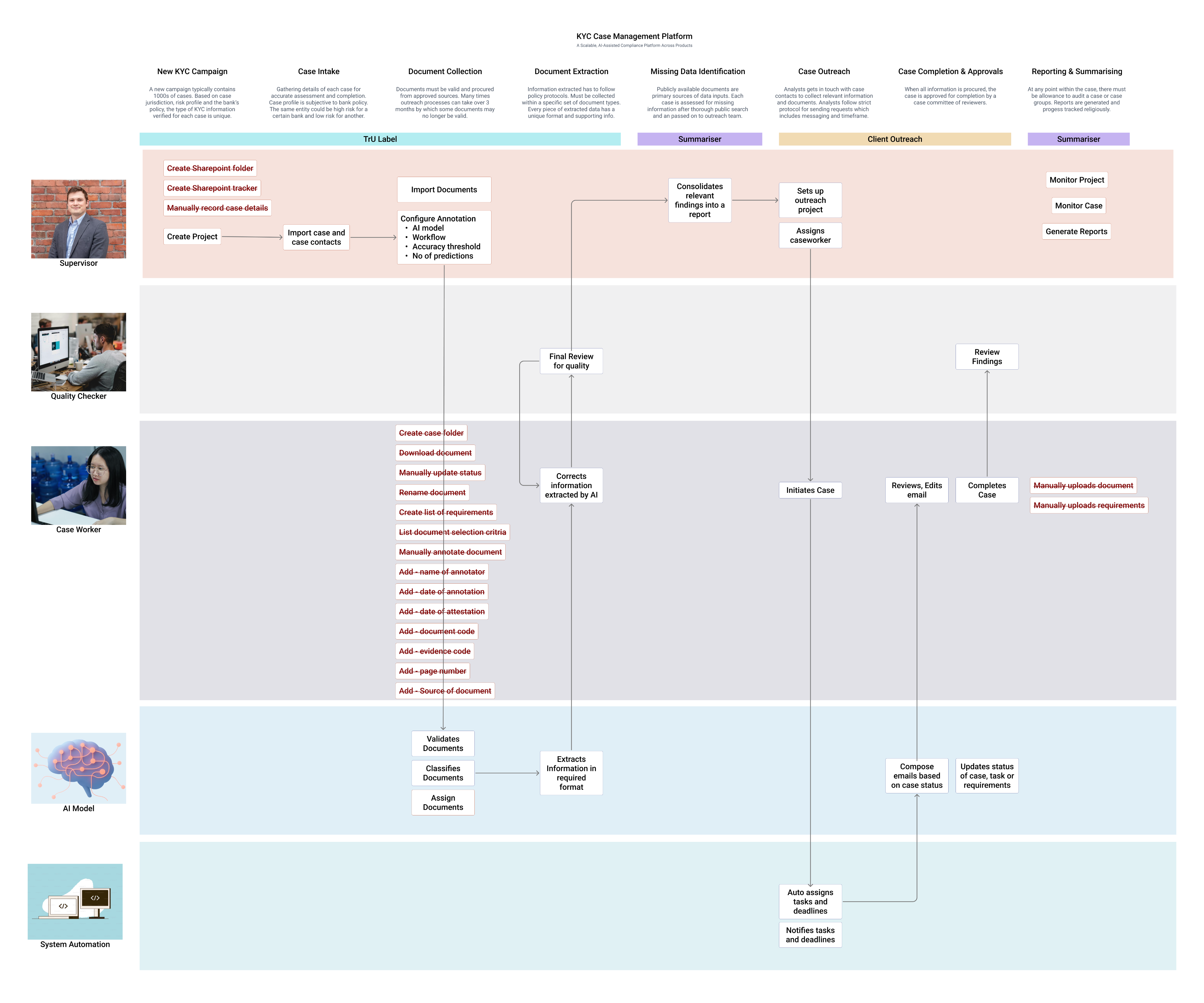
Before AI-assisted workflows, analysts manually classified documents, extracted data, selected evidences, and updated case statuses across disconnected tools. Every step required full manual effort, resulting in high cognitive load, frequent context switching, and limited scalability as volumes increased.
After:
With AI-assisted, human-in-the-loop workflows, document classification and evidence suggestions are prefilled by AI, allowing analysts and reviewers to focus on validation and exceptions. Integrated workflows, role-specific views, and traceable review states reduced manual effort while maintaining compliance, transparency, and operational control.
Platform Outcomes
Efficiency & Scale
Case throughput per analyst
Steady increase
Reduced manual annotation effort
50% +
Outreach completion time
35% faster
Accuracy & Compliance
Reduction in rework loops
Steady increase
Reviewer rejection rates
Steady increase
Analysts
Onboard new clients directly without customisation
80%+
Adoption of AI-assisted workflows across teams
100%
UX Success Metrics
Efficiency
Time-on-task for document validation
Time to identify missing information
Number of clicks / context switches per case
Error Reduction
Annotation correction frequency
Missed evidence rates
Incorrect case status transitions
Cognitive Load
Task completion without external tools
Analyst-reported fatigue during long sessions
User Feedback
Analysts
“Validation feels more like supervision than manual work”
Analysts
“Don’t want to go back earlier ways of working with tool.”
Analysts
“I feel more confident to handle complex cases”
Operations & Supervisors
“I have increased visibility into case progress and bottlenecks”
Operations & Supervisors
“Workload distribution has become easier”
Compliance & Risk
“A noticeable change and stronger alignment with regulatory expectations”
Interaction Design Portfolios
Annotation Tool
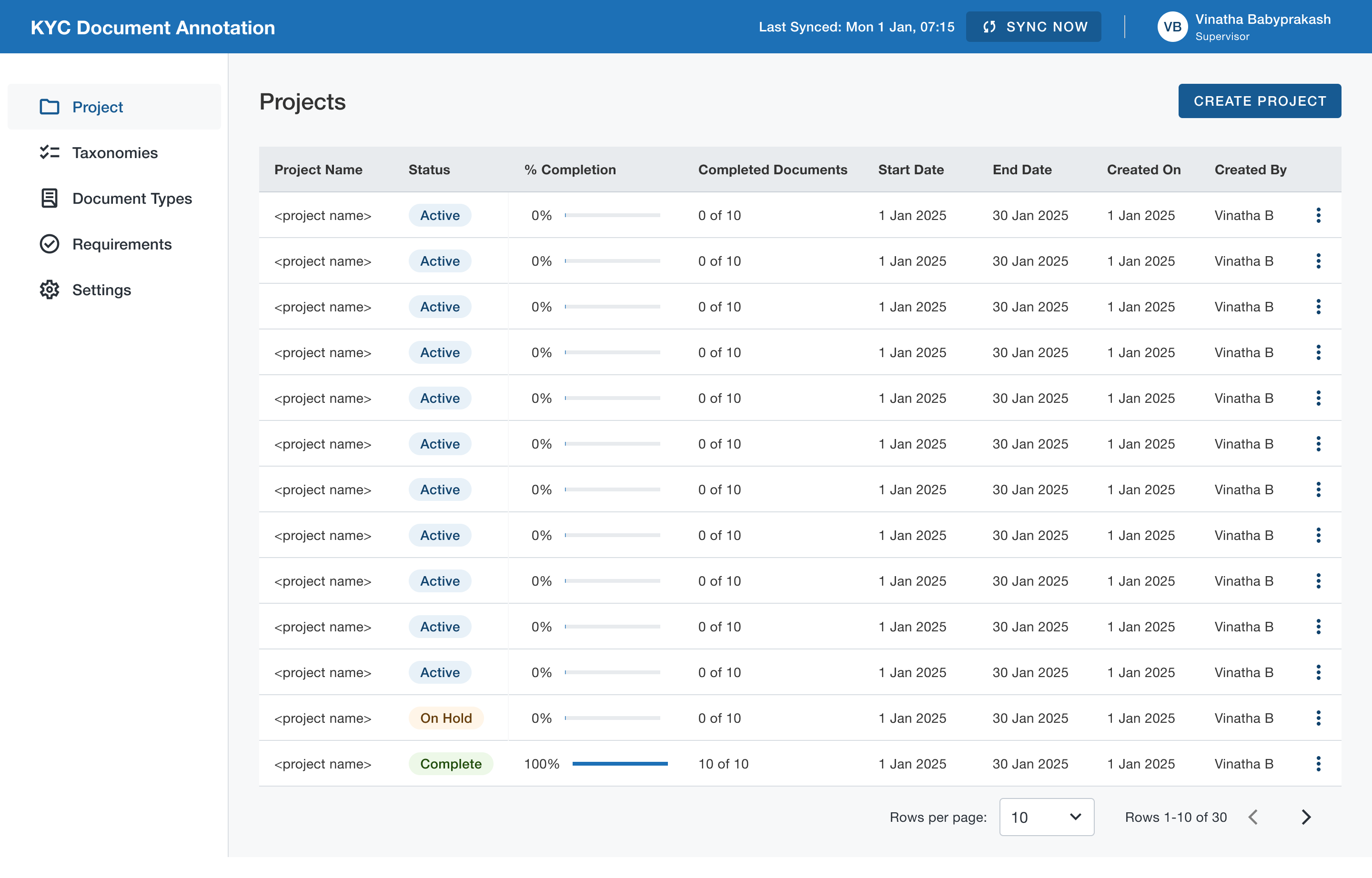
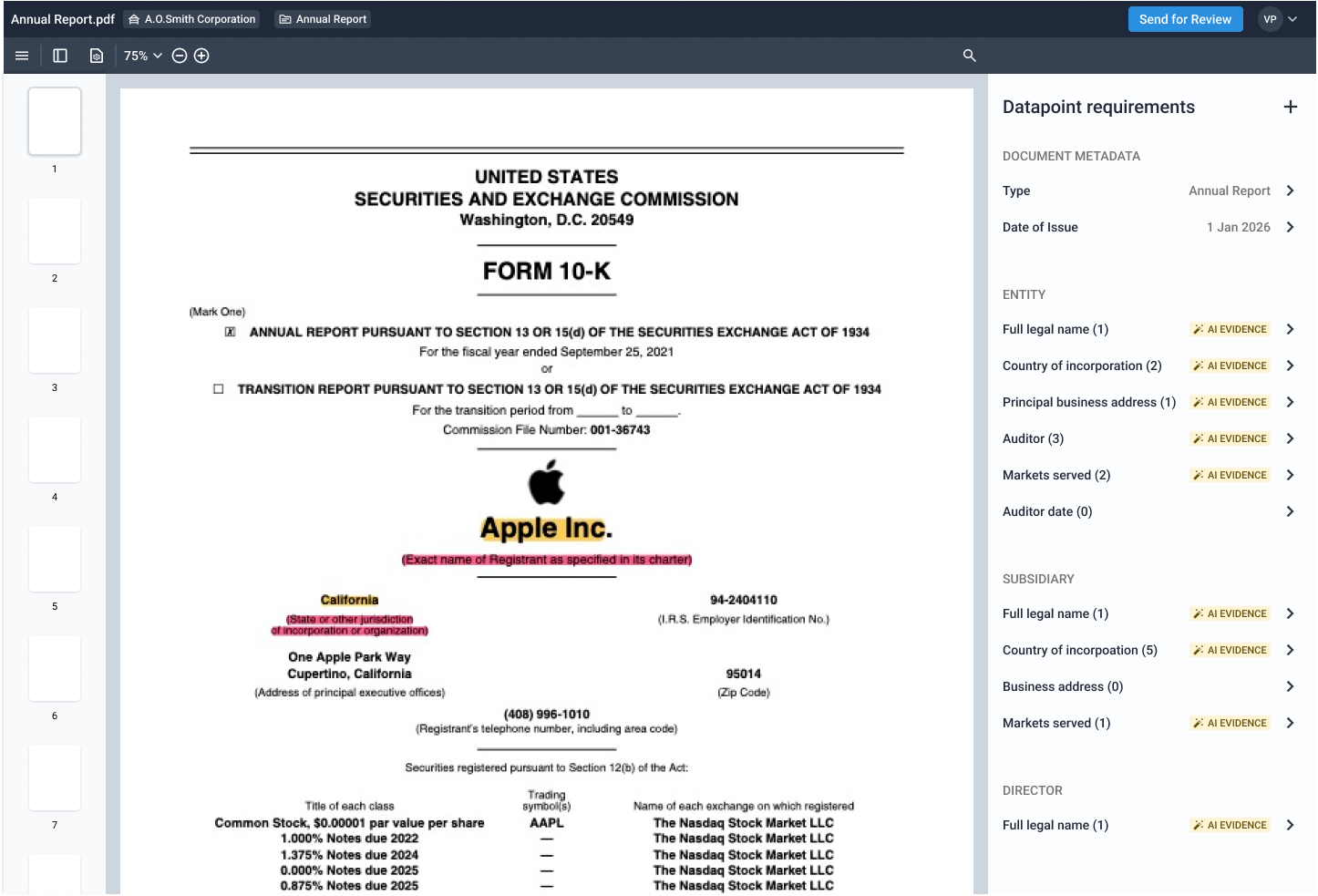
Traditional annotation was a multi step regulatory process. Annotators had to constantly switch contexts between various tools. So we needed to give them a single platform where they could view, annotate and submit documents. At the same time, data science team was in dire need for true KYC data to train models. So we combined the two.
Case Management
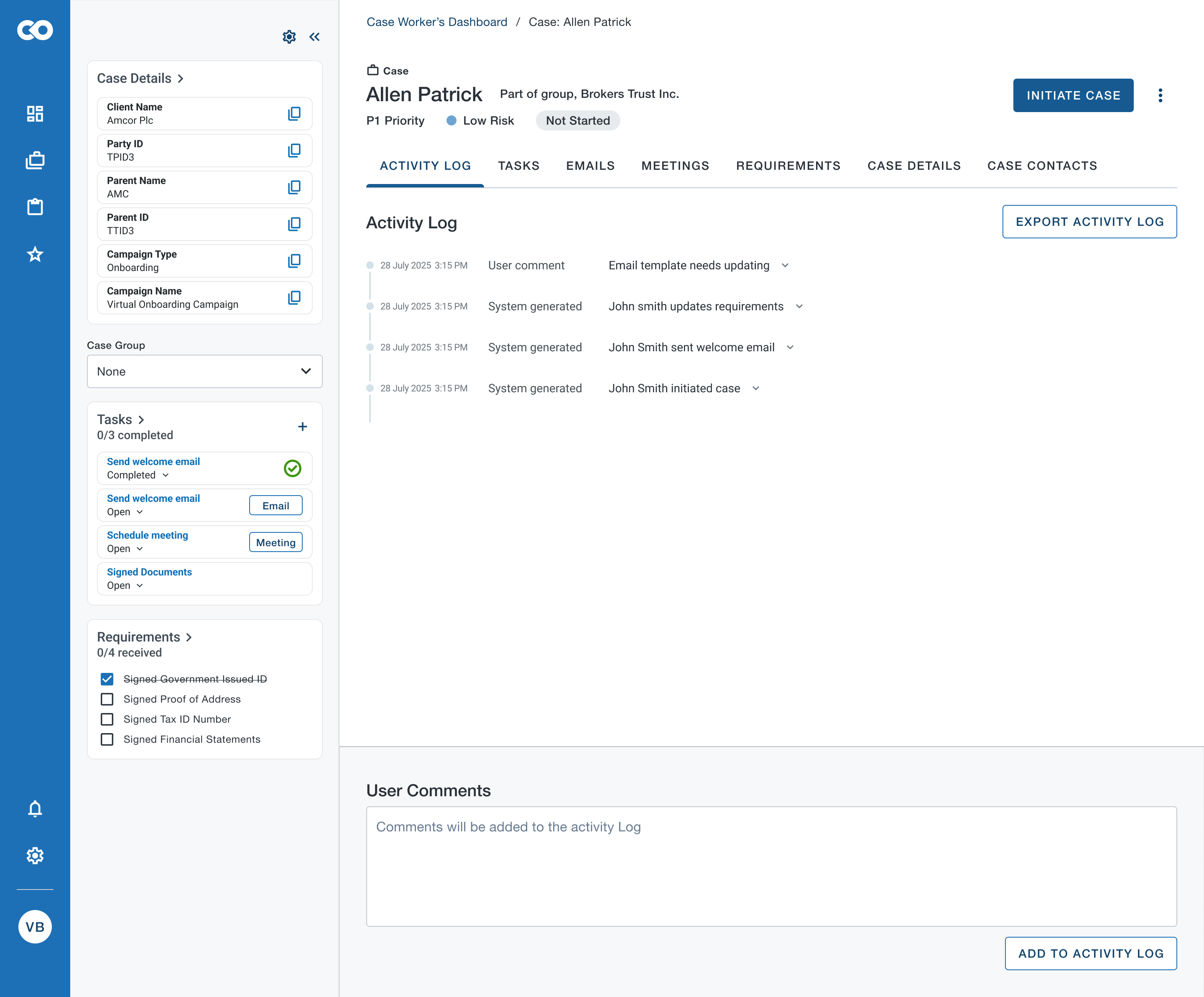
Case information was multilayered and complicated. However case workers needed to refer to simultaneous information pertaining to a case to make an informed decision. The existing UI used tabs which was time taking when user had to refer to various pieces of information across tabs. So explored to have a workstation where different pieces of information were readily available to the case analyst.
AI Model Settings
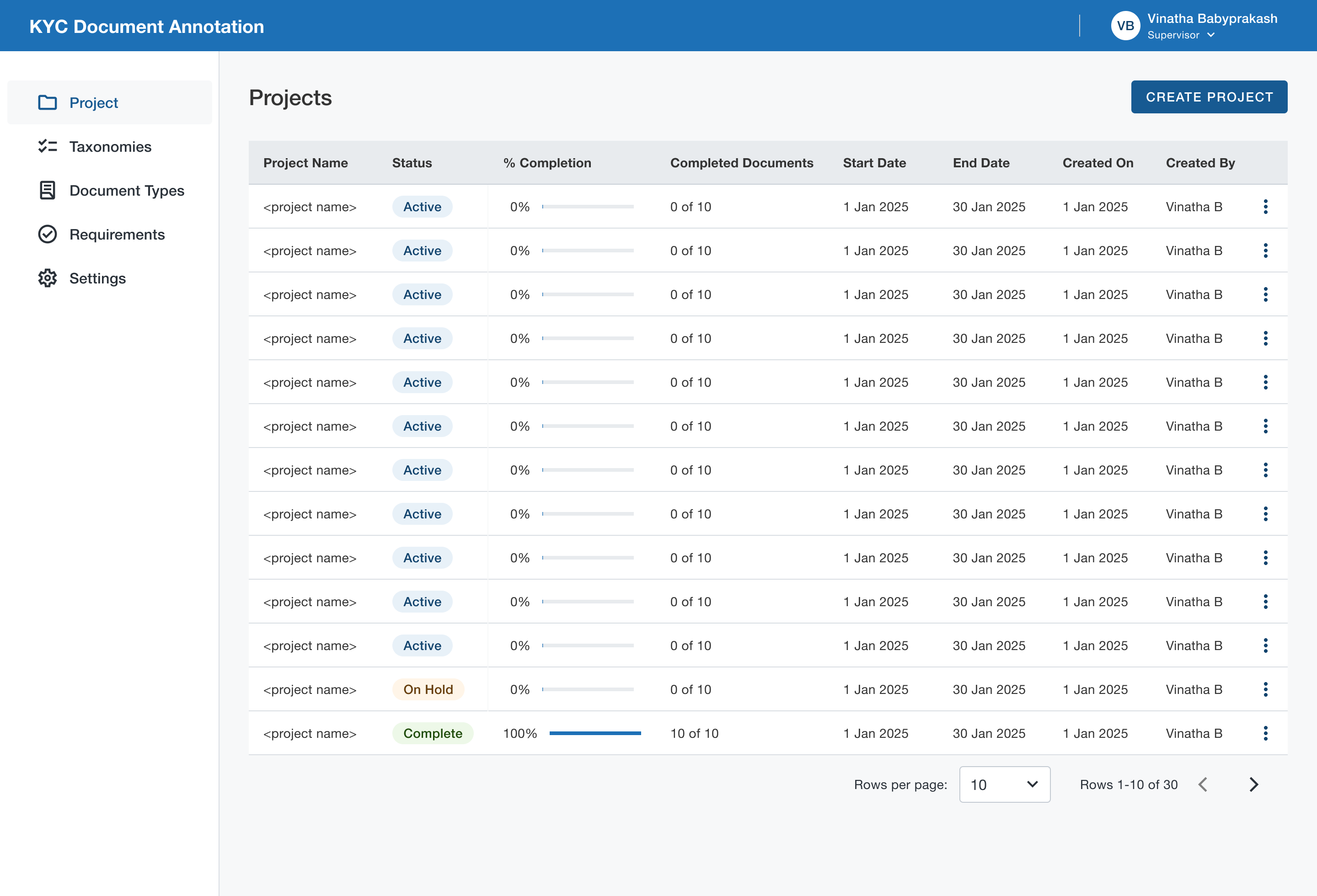
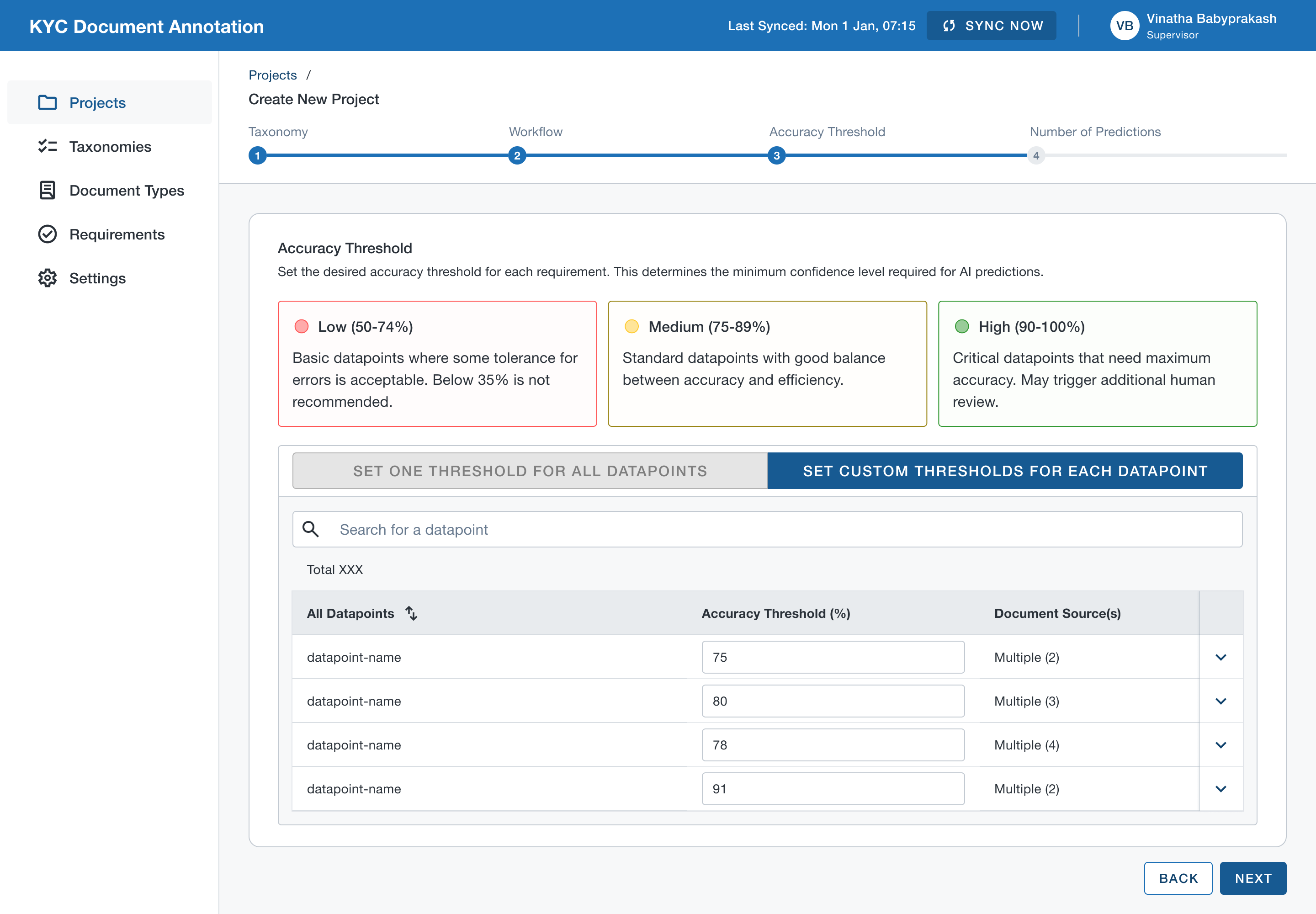
Regulatory audit requirements demanded that AI could only be introduced strategically and human involvement in reviewing final decisions was mandatory. Also, the accuracy threshold across document types were not uniform. So explored options for users to set accuracy thresholds to determined the level of AI involved in annotation process.
Entity Summariser
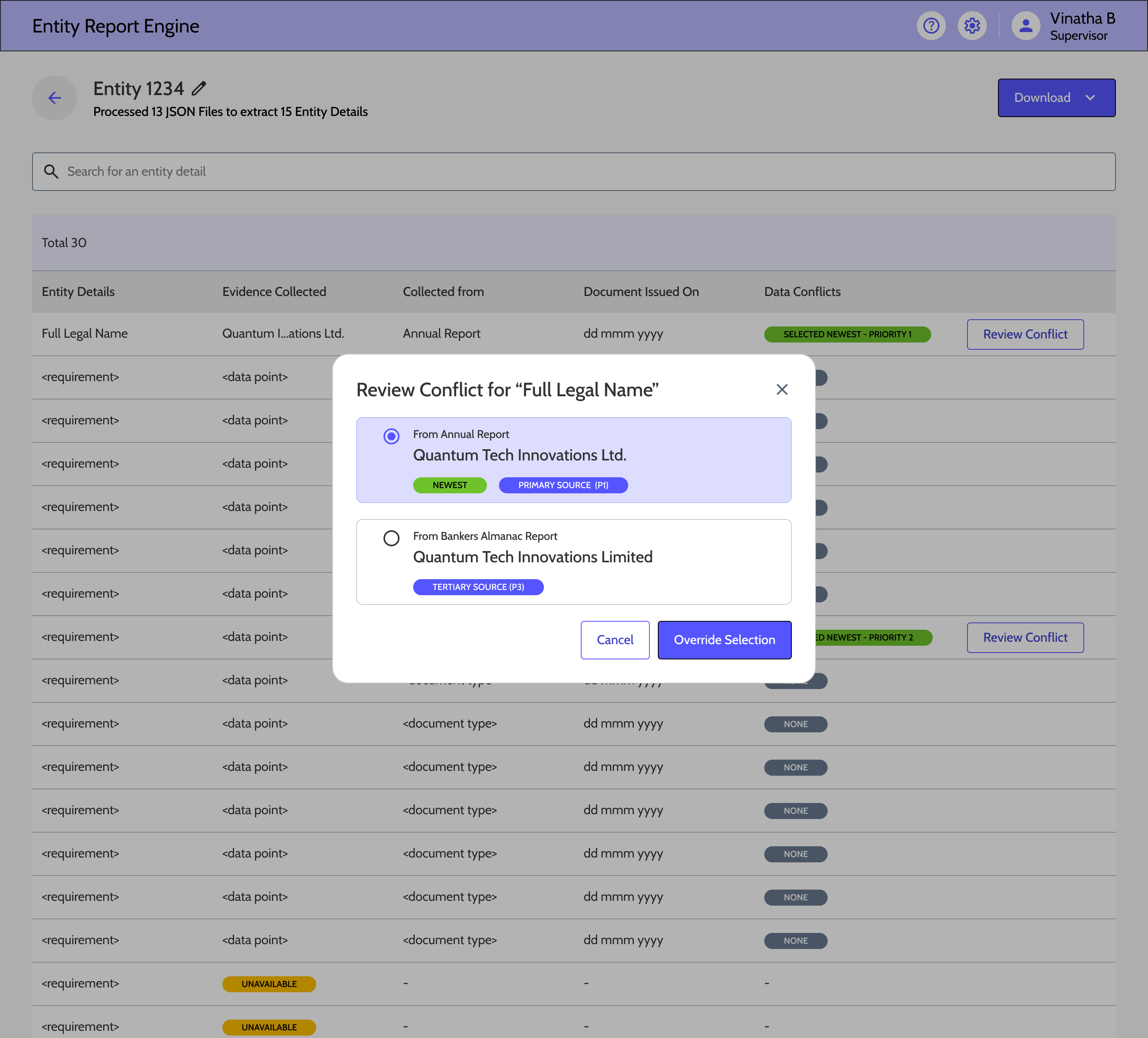
Many times multiple documents are annotated against a single entity. The information collected against a KYC requirements across multiple documents can be conflicting. In practice, human annotators follow certain rules to resolve these conflicts. We decided to create a rule based engine that helps to automatically resolve data conflicts.
Design System & Scale Considerations
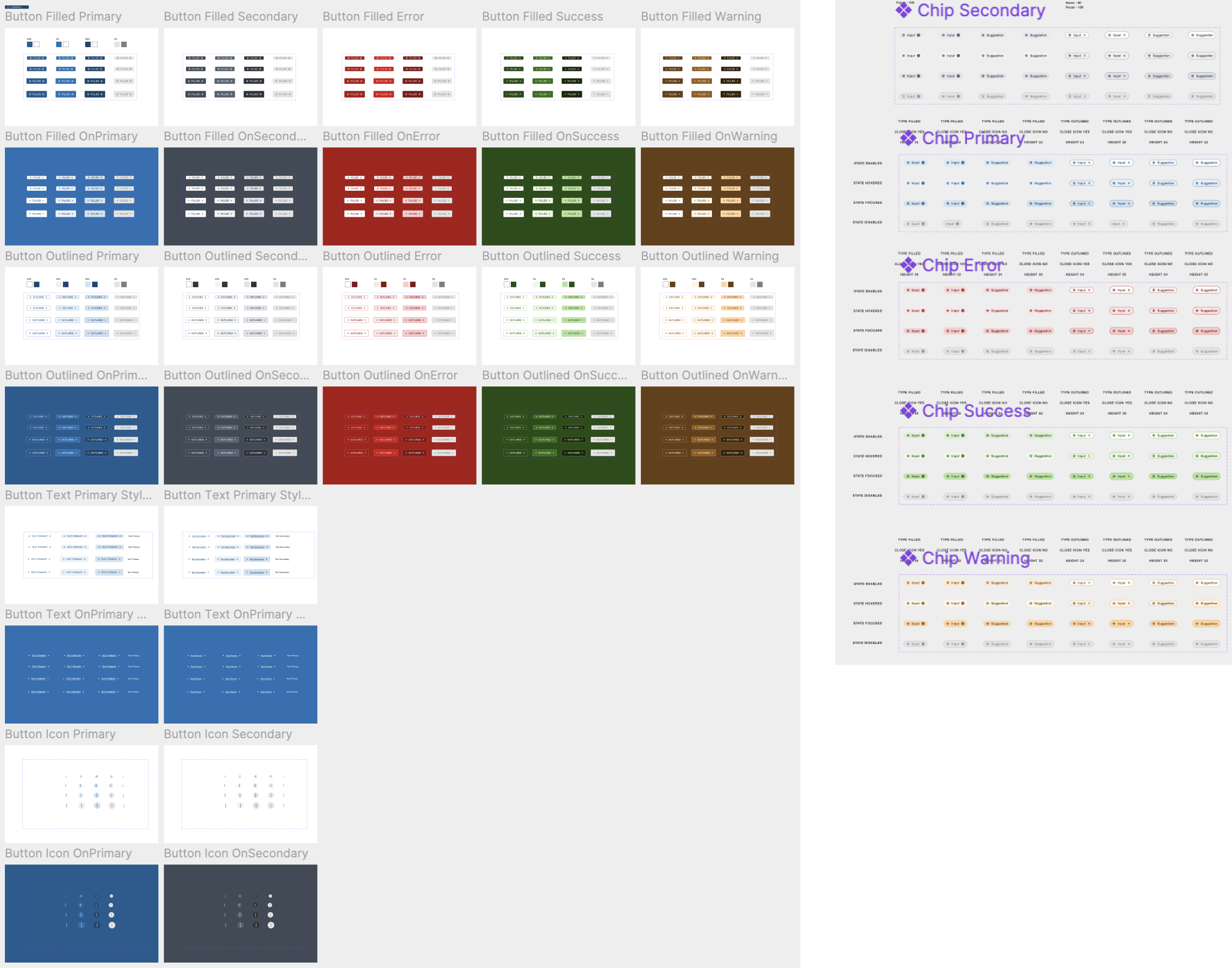
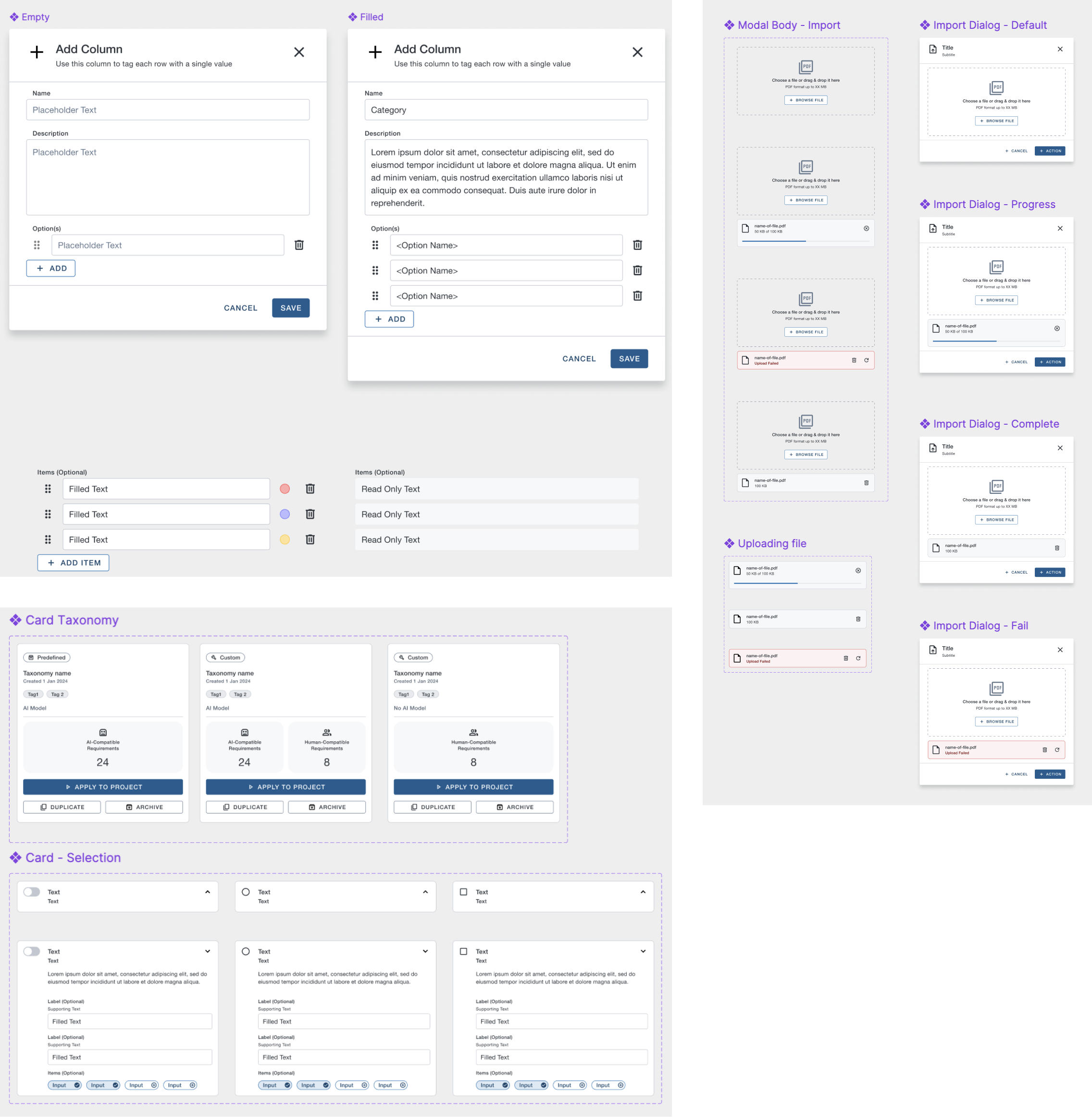
As the platform grew, consistency became a feature. I led the creation of shared components and interaction patterns—especially for AI validation and compliance workflows—which reduced rework, improved accessibility, and allowed teams to ship faster without fragmenting the experience.
My Role
- Defined system principles and usage guidelines
- Reviewed designs for consistency and scalability
- Mentored designers on system-first thinking
- Partnered with engineering on feasibility and maintenance
Accessibility & Inclusive nature
- WCAG-compliant colour contrast and iconography
- Full keyboard navigation for high-volume workflows
- Clear focus management in state transitions
- Standardised components ensured design consistency
- Engineers reused validated patterns across features
- Reduced QA cycles due to predictable behaviour
- Faster design-to-dev handoff, as we progressed
- Reduced cognitive load for users moving between tools
Collaboration & Influence
As the platform lead, my role went beyond design execution. I partnered deeply with PM, engineering, data science, and compliance to make system-level decisions—especially around AI responsibility, compliance checkpoints, and scalability. A big part of my impact was aligning multiple teams around shared workflows and principles.
Product Management
- Co-framed platform-level problem statements and success metrics
- Influenced quarterly planning & roadmap sequencing based on workflow dependencies
Engineering & Architecture
- Partnered early to understand system constraints and backend data flows
- Used state patterns to align on lifecycle modelling and edge cases
Data Science
- Shaped where AI could assist vs where humans must decide
- Translated model confidence and failure modes into UX safeguards
- Aligned on feedback loops between user corrections and model learning
Compliance & Risk
- Embedded regulatory requirements into interaction design
- Negotiated review checkpoints and mandatory confirmations
Delivery
- Delivered engineering-ready Figma files ahead of sprint
- Worked one sprint ahead to de-risk complex workflows
- Used shared artefacts as a single source of truth
- Held design walkthroughs with engineering & QA
- Participated in design QA during development
Trade-offs Negotiated with Stakeholders
- Maintained human sign-off at high-risk points
- Added explanations instead of hiding uncertainty
- Pushed for configurable workflows instead of bespoke solutions
- Phased advanced features without compromising core workflows
Aligning Teams
- Ran regular cross-team reviews
- Acted as UX point-of-contact across platform
Reflection & Learnings
This project reinforced that successful AI in regulated environments is about trust, accountability, and scalability. The biggest lesson was designing systems that grow with both AI maturity and regulatory confidence.
What Worked & What I Learned
- One of the biggest learnings was that trust doesn’t come from automation — it comes from clarity.
- Analysts needed to immediately see what came from AI and what didn’t, and feel safe overriding it.
- Once the system behaved consistently and explained itself, adoption followed naturally.
- We learned that human-in-the-loop isn’t just adding a review step.
- It’s about redesigning the entire workflow so validation feels like supervision, not busywork.
What I’d Do Differently
- I’d invest earlier in supervisor-level configurations, not just analyst workflows.
- Configurable workflows paid off — we could support multiple banks without custom builds.
- I would be much more intentional about building flexibility early, especially in regulated spaces. And include risk partnership earlier in projects
Vinatha Babyprakash
Product designer with over 14 years of experience shaping enterprise SaaS and human-AI experiences
Selected Work
Here is a sample of user-centric design projects I’ve worked on.
CASE STUDY
AI-Assisted Document Annotation & Case Management
2023-2026
FinTrU’s KYC annotation platform supports high-volume document processing for regulatory compliance. The platform evolved from fully manual annotation workflows to AI-assisted, human-in-the-loop processing where machine learning models now perform classification and much of the initial extraction, with analysts validating and correcting outputs.
Role Context at FinTrU
I was hired by FinTrU to lead the design function, managing a team of three to four product designers and two UX researchers. My remit was to define design strategy, set quality standards, and guide the team in delivering software solutions to improve the operational efficiency of FinTrU’s KYC services for major banking clients including Morgan Stanley, RBC, and Santander.
This was a 0–1 product initiative focused on transforming highly manual compliance operations into scalable software-supported workflows. We began by deeply studying how service teams processed KYC documentation manually, conducting detailed workflow analysis and mapping complex end-to-end journey maps to uncover inefficiencies and decision points.
Working closely with product, engineering, and data science teams, we translated these insights into software-driven workflows that incrementally enhanced operations and later incorporated AI models to assist with document classification, data extraction, and validation. Through an iterative, research-led approach, we designed a platform that improved productivity while preserving the accuracy, transparency, and regulatory control required in highly regulated banking environments.
Understanding the problem space
FinTrU’s KYC operations relied heavily on manual document processing and were increasingly difficult to scale.
Due to the nature of service-led, human-only workflows, document classification, data extraction, and evidence validation required significant manual effort across high-volume cases. From an operational perspective, this resulted in slower turnaround times, analyst fatigue, and limited efficiency gains as client volumes increased.
I ran discovery sessions and workflow workshops with service teams, compliance stakeholders, and product partners to identify operational bottlenecks and decision points.
Using these insights, I led a team of designers and researchers to map complex end-to-end journeys and define software-led workflows that could be taken forward into prototyping and iterative validation, forming the foundation for AI-assisted solutions.
Research & Discovery
Qualitative Analysis
Contextual interviews with KYC analysts, reviewers, supervisors
Workflow shadowing during live KYC case handling
Tool walkthroughs of existing spreadsheets, inboxes, and annotation tools
Quantitative & Artefact Analysis
Time-and-motion studies of manual annotation workflows
Audit log reviews to understand compliance requirements
Audit log reviews to understand compliance requirements
Case lifecycle analysis (delays, rework loops, handoffs)
Validation
Usability testing with interactive prototypes
Pilot feedback from production-like environments
Key Behavioural Insights
Analysts
Observations
- Analysts worked under sustained cognitive load, juggling 40+ active cases with limited ability to retain case context in memory.
- Workflows were fragmented across Excel trackers, shared folders, and PDF tools, creating early friction and forcing frequent context switching.
- Manual annotation tools failed to reflect the structured nature of annotations, making it difficult to link related data points and evidences across documents.
- Repetitive cross-checking and document matching increased fatigue, with error rates rising later in the day.
- Analysts mentally triaged cases before opening them, prioritising perceived low-risk work to manage workload pressure.
- When AI suggestions were present, analysts rarely questioned them in low-risk scenarios, revealing a trust model based on perceived regulatory risk rather than accuracy alone.
Edge Cases
- Case statuses were often not updated in real time, leading to visibility gaps and downstream tracking issues.
- Conflicting data points across documents within the same case required escalation, as analysts could not resolve discrepancies independently.
- Bulk outreach workflows reduced per-case ownership, increasing the risk of missed updates or incomplete reviews.
- AI errors in low-risk documents frequently went unnoticed, as analysts prioritised speed over deep validation when perceived risk was low.
Insights
- Reducing context switching has a greater impact than speeding up individual actions.
- Analysts need support maintaining case context across documents, not just faster annotation tools.
- AI is most effective when it supports validation rather than replacing judgement.
Reviewers
Observations
- Locating documents assigned for review was slow and required unnecessary navigation.
- Providing review feedback lacked a clear in-product mechanism, forcing reviewers to rely on external tools such as team chat, with no persistent record of decisions.
- While reviewing annotations was quick for senior analysts, the surrounding administrative steps were disproportionately time-consuming.
- Reviewers focused on identifying exceptions rather than rechecking completeness.
- Pattern recognition and rapid visual scanning were the primary review strategies.
Edge Cases
- Some documents required multiple annotator–reviewer cycles, with no structured way to capture review history or rationale.
- Manual rework loops resulted in poor traceability and limited audit visibility.
- High-risk cases triggered slower, more cautious behaviour and increased manual scrutiny.
Insights
- Review workflows should prioritise exception handling over full revalidation.
- Mandatory review states are essential to ensure accountability and audit readiness.
- Human-in-the-loop checkpoints must be explicit and traceable, not implicit.
- The same data requires different representations depending on reviewer versus annotator needs.
Supervisors
Observations
- Supervisors lacked visibility into case progress across entities belonging to the same parent company.
- Operational efficiency and team performance had to be calculated manually, outside the platform.
- Identifying blockers within a project was difficult, increasing the risk of late-stage delays.
- Project metrics relied on manually updated case statuses, which were often outdated or inconsistent.
- Supervisors focused on throughput, bottlenecks, and risk distribution rather than individual case details.
- Individual cases were rarely inspected unless surfaced by metrics or alerts.
Edge Cases
- A single stalled case could block completion of an entire project, with no clear way to identify or surface it.
- Missing or incomplete documents were often discovered late in the workflow, requiring rework and timeline extensions.
Insights
- Bulk efficiency must not come at the cost of individual case accountability.
- A case-first architecture is essential for meaningful progress tracking across projects and entities.
- Early investment in configurability scales better than client-specific custom builds.
- Supervisors need surfaced signals and exceptions, not exhaustive data views.
Before-After Workflow
Before:
Before AI-assisted workflows, analysts manually classified documents, extracted data, selected evidences, and updated case statuses across disconnected tools. Every step required full manual effort, resulting in high cognitive load, frequent context switching, and limited scalability as volumes increased.
After:
With AI-assisted, human-in-the-loop workflows, document classification and evidence suggestions are prefilled by AI, allowing analysts and reviewers to focus on validation and exceptions. Integrated workflows, role-specific views, and traceable review states reduced manual effort while maintaining compliance, transparency, and operational control.
Platform Outcomes
Efficiency & Scale
Case throughput per analyst
Steady increase
Reduced manual annotation effort
50% +
Outreach completion time
35% faster
Accuracy & Compliance
Reduction in rework loops
Steady increase
Reviewer rejection rates
Steady increase
Analysts
Onboard new clients directly without customisation
80%+
Adoption of AI-assisted workflows across teams
100%
UX Success Metrics
Efficiency
Time-on-task for document validation
Time to identify missing information
Number of clicks / context switches per case
Error Reduction
Annotation correction frequency
Missed evidence rates
Incorrect case status transitions
Cognitive Load
Task completion without external tools
Analyst-reported fatigue during long sessions
User Feedback
Analysts
“Validation feels more like supervision than manual work”
Analysts
“Don’t want to go back earlier ways of working with tool.”
Analysts
“I feel more confident to handle complex cases”
Operations & Supervisors
“I have increased visibility into case progress and bottlenecks”
Operations & Supervisors
“Workload distribution has become easier”
Compliance & Risk
“A noticeable change and stronger alignment with regulatory expectations”
Interaction Design Portfolios
Annotation Tool
Traditional annotation was a multi step regulatory process. Annotators had to constantly switch contexts between various tools. So we needed to give them a single platform where they could view, annotate and submit documents. At the same time, data science team was in dire need for true KYC data to train models. So we combined the two.
Case Management
Case information was multilayered and complicated. However case workers needed to refer to simultaneous information pertaining to a case to make an informed decision. The existing UI used tabs which was time taking when user had to refer to various pieces of information across tabs. So explored to have a workstation where different pieces of information were readily available to the case analyst.
AI Model Settings
Regulatory audit requirements demanded that AI could only be introduced strategically and human involvement in reviewing final decisions was mandatory. Also, the accuracy threshold across document types were not uniform. So explored options for users to set accuracy thresholds to determined the level of AI involved in annotation process.
Entity Summariser
Many times multiple documents are annotated against a single entity. The information collected against a KYC requirements across multiple documents can be conflicting. In practice, human annotators follow certain rules to resolve these conflicts. We decided to create a rule based engine that helps to automatically resolve data conflicts.
Design System & Scale Considerations
As the platform grew, consistency became a feature. I led the creation of shared components and interaction patterns—especially for AI validation and compliance workflows—which reduced rework, improved accessibility, and allowed teams to ship faster without fragmenting the experience.
My Role
- Defined system principles and usage guidelines
- Reviewed designs for consistency and scalability
- Mentored designers on system-first thinking
- Partnered with engineering on feasibility and maintenance
Accessibility & Inclusive nature
- WCAG-compliant colour contrast and iconography
- Full keyboard navigation for high-volume workflows
- Clear focus management in state transitions
- Standardised components ensured design consistency
- Engineers reused validated patterns across features
- Reduced QA cycles due to predictable behaviour
- Faster design-to-dev handoff, as we progressed
- Reduced cognitive load for users moving between tools
Collaboration & Influence
As the platform lead, my role went beyond design execution. I partnered deeply with PM, engineering, data science, and compliance to make system-level decisions—especially around AI responsibility, compliance checkpoints, and scalability. A big part of my impact was aligning multiple teams around shared workflows and principles.
Product Management
- Co-framed platform-level problem statements and success metrics
- Influenced quarterly planning & roadmap sequencing based on workflow dependencies
Engineering & Architecture
- Partnered early to understand system constraints and backend data flows
- Used state patterns to align on lifecycle modelling and edge cases
Data Science
- Shaped where AI could assist vs where humans must decide
- Translated model confidence and failure modes into UX safeguards
- Aligned on feedback loops between user corrections and model learning
Compliance & Risk
- Embedded regulatory requirements into interaction design
- Negotiated review checkpoints and mandatory confirmations
Delivery
- Delivered engineering-ready Figma files ahead of sprint
- Worked one sprint ahead to de-risk complex workflows
- Used shared artefacts as a single source of truth
- Held design walkthroughs with engineering & QA
- Participated in design QA during development
Trade-offs Negotiated with Stakeholders
- Maintained human sign-off at high-risk points
- Added explanations instead of hiding uncertainty
- Pushed for configurable workflows instead of bespoke solutions
- Phased advanced features without compromising core workflows
Aligning Teams
- Ran regular cross-team reviews
- Acted as UX point-of-contact across platform
Reflection & Learnings
This project reinforced that successful AI in regulated environments is about trust, accountability, and scalability. The biggest lesson was designing systems that grow with both AI maturity and regulatory confidence.
What Worked & What I Learned
- One of the biggest learnings was that trust doesn’t come from automation — it comes from clarity.
- Analysts needed to immediately see what came from AI and what didn’t, and feel safe overriding it.
- Once the system behaved consistently and explained itself, adoption followed naturally.
- We learned that human-in-the-loop isn’t just adding a review step.
- It’s about redesigning the entire workflow so validation feels like supervision, not busywork.
What I’d Do Differently
- I’d invest earlier in supervisor-level configurations, not just analyst workflows.
- Configurable workflows paid off — we could support multiple banks without custom builds.
- I would be much more intentional about building flexibility early, especially in regulated spaces. And include risk partnership earlier in projects
Vinatha Babyprakash
Strategic UX designer and researcher with 14+ years shaping complex regulated environments, enterprise SaaS and human-AI experiences
Selected Work
Here is a sample of user-centric design projects I’ve worked on.
CASE STUDY

AI-Assisted Document Annotation & Case Management
2023-2026
FinTrU’s KYC annotation platform supports high-volume document processing for regulatory compliance. The platform evolved from fully manual annotation workflows to AI-assisted, human-in-the-loop processing where machine learning models now perform classification and much of the initial extraction, with analysts validating and correcting outputs.
Role Context at FinTrU
I was hired by FinTrU to lead the design function, managing a team of three to four product designers and two UX researchers. My remit was to define design strategy, set quality standards, and guide the team in delivering software solutions to improve the operational efficiency of FinTrU’s KYC services for major banking clients including Morgan Stanley, RBC, and Santander.
This was a 0–1 product initiative focused on transforming highly manual compliance operations into scalable software-supported workflows. We began by deeply studying how service teams processed KYC documentation manually, conducting detailed workflow analysis and mapping complex end-to-end journey maps to uncover inefficiencies and decision points.
Working closely with product, engineering, and data science teams, we translated these insights into software-driven workflows that incrementally enhanced operations and later incorporated AI models to assist with document classification, data extraction, and validation. Through an iterative, research-led approach, we designed a platform that improved productivity while preserving the accuracy, transparency, and regulatory control required in highly regulated banking environments.
Understanding the problem space
FinTrU’s KYC operations relied heavily on manual document processing and were increasingly difficult to scale.
Due to the nature of service-led, human-only workflows, document classification, data extraction, and evidence validation required significant manual effort across high-volume cases. From an operational perspective, this resulted in slower turnaround times, analyst fatigue, and limited efficiency gains as client volumes increased.
I ran discovery sessions and workflow workshops with service teams, compliance stakeholders, and product partners to identify operational bottlenecks and decision points.
Using these insights, I led a team of designers and researchers to map complex end-to-end journeys and define software-led workflows that could be taken forward into prototyping and iterative validation, forming the foundation for AI-assisted solutions.
Research & Discovery
Qualitative Analysis
Contextual interviews with KYC analysts, reviewers, supervisors
Workflow shadowing during live KYC case handling
Tool walkthroughs of existing spreadsheets, inboxes, and annotation tools
Quantitative & Artefact Analysis
Time-and-motion studies of manual annotation workflows
Audit log reviews to understand compliance requirements
Audit log reviews to understand compliance requirements
Case lifecycle analysis (delays, rework loops, handoffs)
Validation
Usability testing with interactive prototypes
Pilot feedback from production-like environments
Key Behavioural Insights
Analysts
Observations
- Analysts worked under sustained cognitive load, juggling 40+ active cases with limited ability to retain case context in memory.
- Workflows were fragmented across Excel trackers, shared folders, and PDF tools, creating early friction and forcing frequent context switching.
- Manual annotation tools failed to reflect the structured nature of annotations, making it difficult to link related data points and evidences across documents.
- Repetitive cross-checking and document matching increased fatigue, with error rates rising later in the day.
- Analysts mentally triaged cases before opening them, prioritising perceived low-risk work to manage workload pressure.
- When AI suggestions were present, analysts rarely questioned them in low-risk scenarios, revealing a trust model based on perceived regulatory risk rather than accuracy alone.
Edge Cases
- Case statuses were often not updated in real time, leading to visibility gaps and downstream tracking issues.
- Conflicting data points across documents within the same case required escalation, as analysts could not resolve discrepancies independently.
- Bulk outreach workflows reduced per-case ownership, increasing the risk of missed updates or incomplete reviews.
- AI errors in low-risk documents frequently went unnoticed, as analysts prioritised speed over deep validation when perceived risk was low.
Insights
- Reducing context switching has a greater impact than speeding up individual actions.
- Analysts need support maintaining case context across documents, not just faster annotation tools.
- AI is most effective when it supports validation rather than replacing judgement.
Reviewers
Observations
- Locating documents assigned for review was slow and required unnecessary navigation.
- Providing review feedback lacked a clear in-product mechanism, forcing reviewers to rely on external tools such as team chat, with no persistent record of decisions.
- While reviewing annotations was quick for senior analysts, the surrounding administrative steps were disproportionately time-consuming.
- Reviewers focused on identifying exceptions rather than rechecking completeness.
- Pattern recognition and rapid visual scanning were the primary review strategies.
Edge Cases
- Some documents required multiple annotator–reviewer cycles, with no structured way to capture review history or rationale.
- Manual rework loops resulted in poor traceability and limited audit visibility.
- High-risk cases triggered slower, more cautious behaviour and increased manual scrutiny.
Insights
- Review workflows should prioritise exception handling over full revalidation.
- Mandatory review states are essential to ensure accountability and audit readiness.
- Human-in-the-loop checkpoints must be explicit and traceable, not implicit.
- The same data requires different representations depending on reviewer versus annotator needs.
Supervisors
Observations
- Supervisors lacked visibility into case progress across entities belonging to the same parent company.
- Operational efficiency and team performance had to be calculated manually, outside the platform.
- Identifying blockers within a project was difficult, increasing the risk of late-stage delays.
- Project metrics relied on manually updated case statuses, which were often outdated or inconsistent.
- Supervisors focused on throughput, bottlenecks, and risk distribution rather than individual case details.
- Individual cases were rarely inspected unless surfaced by metrics or alerts.
Edge Cases
- A single stalled case could block completion of an entire project, with no clear way to identify or surface it.
- Missing or incomplete documents were often discovered late in the workflow, requiring rework and timeline extensions.
Insights
- Bulk efficiency must not come at the cost of individual case accountability.
- A case-first architecture is essential for meaningful progress tracking across projects and entities.
- Early investment in configurability scales better than client-specific custom builds.
- Supervisors need surfaced signals and exceptions, not exhaustive data views.
Before-After Workflow
Before:
Before AI-assisted workflows, analysts manually classified documents, extracted data, selected evidences, and updated case statuses across disconnected tools. Every step required full manual effort, resulting in high cognitive load, frequent context switching, and limited scalability as volumes increased.
After:
With AI-assisted, human-in-the-loop workflows, document classification and evidence suggestions are prefilled by AI, allowing analysts and reviewers to focus on validation and exceptions. Integrated workflows, role-specific views, and traceable review states reduced manual effort while maintaining compliance, transparency, and operational control.
Platform Outcomes
Efficiency & Scale
Case throughput per analyst
Steady increase
Reduced manual annotation effort
50% +
Outreach completion time
35% faster
Accuracy & Compliance
Reduction in rework loops
Steady increase
Reviewer rejection rates
Steady increase
Analysts
Onboard new clients directly without customisation
80%+
Adoption of AI-assisted workflows across teams
100%
UX Success Metrics
Efficiency
Time-on-task for document validation
Time to identify missing information
Number of clicks / context switches per case
Error Reduction
Annotation correction frequency
Missed evidence rates
Incorrect case status transitions
Cognitive Load
Task completion without external tools
Analyst-reported fatigue during long sessions
User Feedback
Analysts
“Validation feels more like supervision than manual work”
Analysts
“Don’t want to go back earlier ways of working with tool.”
Analysts
“I feel more confident to handle complex cases”
Operations & Supervisors
“I have increased visibility into case progress and bottlenecks”
Operations & Supervisors
“Workload distribution has become easier”
Compliance & Risk
“A noticeable change and stronger alignment with regulatory expectations”
Interaction Design Portfolios
Annotation Tool
Traditional annotation was a multi step regulatory process. Annotators had to constantly switch contexts between various tools. So we needed to give them a single platform where they could view, annotate and submit documents. At the same time, data science team was in dire need for true KYC data to train models. So we combined the two.
Case Management
Case information was multilayered and complicated. However case workers needed to refer to simultaneous information pertaining to a case to make an informed decision. The existing UI used tabs which was time taking when user had to refer to various pieces of information across tabs. So explored to have a workstation where different pieces of information were readily available to the case analyst.
AI Model Settings
Regulatory audit requirements demanded that AI could only be introduced strategically and human involvement in reviewing final decisions was mandatory. Also, the accuracy threshold across document types were not uniform. So explored options for users to set accuracy thresholds to determined the level of AI involved in annotation process.
Entity Summariser
Many times multiple documents are annotated against a single entity. The information collected against a KYC requirements across multiple documents can be conflicting. In practice, human annotators follow certain rules to resolve these conflicts. We decided to create a rule based engine that helps to automatically resolve data conflicts.
Design System & Scale Considerations
As the platform grew, consistency became a feature. I led the creation of shared components and interaction patterns—especially for AI validation and compliance workflows—which reduced rework, improved accessibility, and allowed teams to ship faster without fragmenting the experience.
My Role
- Defined system principles and usage guidelines
- Reviewed designs for consistency and scalability
- Mentored designers on system-first thinking
- Partnered with engineering on feasibility and maintenance
Accessibility & Inclusive nature
- WCAG-compliant colour contrast and iconography
- Full keyboard navigation for high-volume workflows
- Clear focus management in state transitions
- Standardised components ensured design consistency
- Engineers reused validated patterns across features
- Reduced QA cycles due to predictable behaviour
- Faster design-to-dev handoff, as we progressed
- Reduced cognitive load for users moving between tools
Collaboration & Influence
As the platform lead, my role went beyond design execution. I partnered deeply with PM, engineering, data science, and compliance to make system-level decisions—especially around AI responsibility, compliance checkpoints, and scalability. A big part of my impact was aligning multiple teams around shared workflows and principles.
Product Management
- Co-framed platform-level problem statements and success metrics
- Influenced quarterly planning & roadmap sequencing based on workflow dependencies
Engineering & Architecture
- Partnered early to understand system constraints and backend data flows
- Used state patterns to align on lifecycle modelling and edge cases
Data Science
- Shaped where AI could assist vs where humans must decide
- Translated model confidence and failure modes into UX safeguards
- Aligned on feedback loops between user corrections and model learning
Compliance & Risk
- Embedded regulatory requirements into interaction design
- Negotiated review checkpoints and mandatory confirmations
Delivery
- Delivered engineering-ready Figma files ahead of sprint
- Worked one sprint ahead to de-risk complex workflows
- Used shared artefacts as a single source of truth
- Held design walkthroughs with engineering & QA
- Participated in design QA during development
Trade-offs Negotiated with Stakeholders
- Maintained human sign-off at high-risk points
- Added explanations instead of hiding uncertainty
- Pushed for configurable workflows instead of bespoke solutions
- Phased advanced features without compromising core workflows
Aligning Teams
- Ran regular cross-team reviews
- Acted as UX point-of-contact across platform
Reflection & Learnings
This project reinforced that successful AI in regulated environments is about trust, accountability, and scalability. The biggest lesson was designing systems that grow with both AI maturity and regulatory confidence.
What Worked & What I Learned
- One of the biggest learnings was that trust doesn’t come from automation — it comes from clarity.
- Analysts needed to immediately see what came from AI and what didn’t, and feel safe overriding it.
- Once the system behaved consistently and explained itself, adoption followed naturally.
- We learned that human-in-the-loop isn’t just adding a review step.
- It’s about redesigning the entire workflow so validation feels like supervision, not busywork.
What I’d Do Differently
- I’d invest earlier in supervisor-level configurations, not just analyst workflows.
- Configurable workflows paid off — we could support multiple banks without custom builds.
- I would be much more intentional about building flexibility early, especially in regulated spaces. And include risk partnership earlier in projects